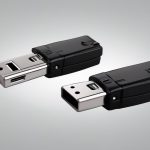

A USB stick hidden camera is a compact camera designed to resemble an ordinary flash drive or thumb drive. Its small lens may be positioned behind a pinhole in the casing, allowing the device to blend into a desk, shelf, charging area, or other everyday setting. Depending on the model, it may record footage to internal storage, connect to a computer through USB, or provide wireless viewing through a smartphone app. This USB stick design is one example among compact surveillance formats, each suited to different discreet monitoring needs.
These devices can be useful for legitimate security and monitoring tasks, but their discreet design also creates significant privacy responsibilities. Before purchasing or using one, consider what you need to record, where the device will be placed, and whether everyone who may be recorded must be informed or provide consent.
How a USB stick camera works
Although the housing resembles a standard USB memory stick, the device usually contains a miniature camera, a battery or power circuit, storage, and control buttons. Some models are functional USB drives that allow recorded files to be transferred to a computer. Others use the USB connection mainly for charging or configuration rather than storing files.
Common designs include:
- Local-recording models: Save video to built-in or removable storage for later review.
- Wi-Fi models: Connect to a phone or network for live viewing and, in some cases, remote file access.
- USB-powered models: Run from a computer, adapter, or power bank for longer recording periods.
- USB-C versions: Use a newer USB-C connector, although connector compatibility does not necessarily indicate better camera performance.
Features to compare
Video quality and lighting
Resolution affects how clearly people, objects, and activity appear in recorded footage. A higher resolution can help with detail, but lighting, lens quality, positioning, and compression also have a major impact. If recording may take place in dim conditions, check whether the device includes low-light capability or infrared illumination. Night-vision features can affect the camera’s appearance and may not produce the same results as daytime recording.
Storage and recording modes
Check how much footage the device can hold and how files are transferred. Motion detection can reduce unnecessary recording, while loop recording automatically replaces older files when storage is full. Review the file format and whether a computer or mobile app is required to open the recordings. A device with simple USB file access may be preferable when wireless connectivity is unnecessary.
Power and battery life
Battery-powered cameras are portable but require regular charging and may stop recording when the battery is depleted. Models designed for continuous USB power are better suited to extended monitoring, provided the cable and power source can remain connected safely. Test the actual operating time before relying on the camera for an important security purpose. For broader coverage beyond a USB stick design, consider unobtrusive outdoor monitoring options suited to blank camera setups.
Audio and connectivity
Some USB stick cameras record sound as well as video. Audio surveillance is often subject to stricter rules than video recording, so do not assume that capturing sound is permitted simply because the device includes a microphone. Wi-Fi features may allow live viewing, but they can introduce setup, network-security, and app-compatibility considerations.
Legitimate applications
When used lawfully and with appropriate notice or consent, a compact USB camera may support home security, pet monitoring, documentation of property damage, or protection of a small workspace. It can also be used to monitor a storage area or check activity around an entry point. In many situations, a visible security camera is a better choice because it is easier to explain, more transparent, and less likely to create a privacy dispute.
Do not use a hidden camera to record people in places where they reasonably expect privacy. Bathrooms, changing areas, bedrooms, and similar private spaces are especially sensitive and may be prohibited locations. Recording employees, guests, tenants, caregivers, or visitors may also require disclosure or consent depending on local law and the circumstances.
Setting up a USB stick camera responsibly
- Confirm the rules first. Check applicable privacy, workplace, housing, and audio-recording requirements before recording.
- Test the device openly and privately. Verify video quality, time and date settings, storage capacity, battery performance, and file playback.
- Choose a limited field of view. Aim only at the area necessary for the stated security purpose, avoiding neighboring property and private spaces.
- Secure the footage. Use strong account credentials for Wi-Fi models and store recordings where unauthorized people cannot access them.
- Set a retention period. Delete footage that is no longer needed, particularly when it contains identifiable people or sensitive activity.
Choosing an appropriate option
The best USB stick camera is not necessarily the smallest or most feature-rich model. Choose according to the recording environment, required runtime, lighting, storage method, and legal obligations. For many security needs, a clearly disclosed camera with visible placement, dependable power, and straightforward file access provides a safer and more practical solution than a concealed device.
Used carefully, a USB-form-factor camera can provide compact monitoring for lawful purposes. Responsible placement, restricted recording, secure storage, and respect for consent are just as important as resolution, battery life, or wireless connectivity.