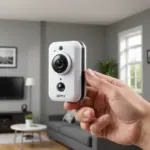

Cellular spy cameras are compact surveillance devices that use a mobile network to transmit video, alerts, or both. Unlike Wi‑Fi cameras, they can operate in locations without fixed broadband, making them useful for remote properties, temporary work sites, vehicles, and other places where a wired internet connection is impractical. Explore cellular camera options by comparing specific spy camera types suited to different monitoring needs.
The term can describe several designs, including purpose-built concealed cameras and ordinary-looking devices with an integrated camera module. Although these products are often marketed for discreet monitoring, they should only be used for lawful, necessary security purposes and with proper respect for privacy.
How a cellular spy camera works
A typical cellular camera combines four main components:
- A camera sensor for capturing still images or video
- A cellular modem that connects to a compatible mobile network
- A SIM card slot or eSIM support for network access
- A battery or another power source for continued operation
Depending on the model, the camera may stream live video, upload recordings when motion is detected, or send an alert to a mobile app. Some devices also provide scheduled recording, two-way audio, local microSD storage, cloud storage, night vision, GPS, or an external antenna. Features vary considerably, so the best choice depends on whether the priority is temporary deployment, long battery life, image quality, or dependable connectivity.
Where cellular cameras can be useful
Cellular connectivity is most valuable where installing internet service would be difficult, expensive, or temporary. Common legitimate applications include:
- Remote property monitoring: Check a holiday home, storage area, or rural building and receive alerts about activity.
- Construction and maintenance sites: Monitor equipment, tools, and materials when a site does not yet have broadband.
- Vehicles and trailers: Add a security camera to a car, RV, trailer, or other asset where a fixed internet connection is unavailable.
- Temporary locations: Monitor pop-up facilities, outdoor events, or short-term work areas without installing permanent infrastructure.
- Care and safety checks: Support remote checks on a person or property when the arrangement is lawful, appropriate, and based on informed consent.
What to consider before buying
Network compatibility
Confirm that the camera supports the mobile network bands available in the intended location. Check whether it accepts a physical SIM or eSIM, and determine whether the required service plan supports the device. A strong signal at home does not guarantee reliable service at a remote mounting point, so test reception where the camera will actually be installed.
Power and placement
Battery capacity is important for cameras installed away from a mains outlet. Rechargeable batteries can simplify temporary deployments, while solar charging may extend operating time in suitable outdoor conditions. Place the device where it has a clear view, adequate network reception, and protection from weather if it is not designed for outdoor use. For discreet remote viewing, remote pet monitoring complements cellular surveillance when checking pets while away from home.
Image and alert performance
Choose a resolution suitable for the required level of detail, and consider night vision if monitoring will continue in low light. Motion detection controls can help reduce unnecessary alerts caused by animals, vegetation, or passing traffic. Two-way audio, local storage, and cloud recording may be useful, but each can affect battery life, privacy, or data consumption.
Data costs and security
Live video can use substantially more mobile data than occasional alerts or short clips. Estimate expected usage before selecting a plan and monitor consumption after installation. Prefer devices that provide secure account controls, encrypted transmission where supported, strong passwords, and regular firmware updates.
Responsible setup and legal considerations
Before activating the camera, identify exactly what it can record and whether anyone nearby has a reasonable expectation of privacy. Laws covering video recording, audio capture, workplace surveillance, residential monitoring, and data storage differ by jurisdiction. Audio may be subject to separate or stricter rules than video. Do not place a camera in private spaces or record people without the permissions required by local law.
Use visible notices or obtain consent where appropriate, especially in shared, residential, commercial, or workplace environments. Keep a clear security purpose for the deployment, limit access to recordings, and retain footage only as long as necessary. These precautions are particularly important when a camera is designed to blend into its surroundings.
Maintenance and troubleshooting
Inspect the camera regularly, clean the lens and housing, and check the battery level, storage capacity, and data usage. Keep firmware and the companion app updated when updates are available. If the connection fails, verify SIM activation, account status, signal strength, and antenna placement. Repositioning the device may improve reception, but persistent dropouts can indicate that the camera or network is unsuitable for the location.
Test motion zones and sensitivity after installation, then review alerts to reduce false notifications. Back up important footage to a secure location and protect the camera account with unique credentials. With suitable network coverage, dependable power, and lawful deployment, a cellular camera can provide flexible remote monitoring where Wi‑Fi is not a practical option.